
Label Printing · Canyon Falls Business Solutions
Print Your Own Labels In-House: A Guide to Canon’s Label Printers
Waiting on a print shop for every product label ties up cash, storage space, and deadlines. Here’s how on-demand label printing works, who it fits, and how to pick the right Canon model for your business.
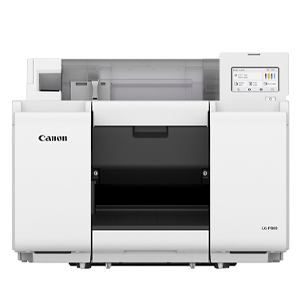
The Canon LG-P800 — an 8" pigment-based inkjet label printer, available through Canyon Falls.
If you sell a product, you probably need labels. And if you order them pre-printed in big batches, you know the trade-offs: minimum order quantities, boxes of stock sitting on a shelf, and a scramble whenever an ingredient, price, or design changes.
On-demand label printing flips that. You print the quantity you need, when you need it — whether that’s a single sample or a full production run. Canon’s label printer lineup is built for exactly this, and Canyon Falls sells it right here in Indianapolis.
Who Prints Their Own Labels?
Canon designed its label printers for a wide mix of uses, including:
- Food and beverage — product and packaging labels
- Cosmetics and home goods — branded, full-color product labels
- Product packaging and product identification
- Inventory and shipping — barcodes, QR codes, and variable data
- Retail and horticulture — shelf, plant, and merchandise labels
The common thread is high-mix, low-to-medium volume work, where flexibility matters more than running one label for months. Printing on demand also helps reduce excess inventory and material waste.
Dye or Pigment: Which Ink Is Right?
Canon’s current label printer lineup includes both ink types:
Dye-Based
LX-D1300 and LX-D400. Full-color inkjet labels in a desktop footprint, from 2″ to 4.5″ wide.
Pigment-Based
LX-P1300, LX-P5510 and LG-P800. Canon formulates the LG-P800’s pigment inks to resist water, smudging, and fading (results vary by media), which makes pigment worth a look for labels that get handled or exposed to moisture.
Choose by Label Size and Speed
The biggest decision is how wide your labels are. All five models print at 1200 x 1200 dpi, so match the printer to your largest label first:
| Model | Ink | Label width | Default speed |
|---|---|---|---|
| LX-D1300 | Dye | Up to 2" | 4.7"/s |
| LX-P1300 | Pigment | Up to 2" | 4.7"/s |
| LX-D400 | Dye | Up to 4.5" | 9.4"/s |
| LX-P5510 | Pigment | Up to 4" | 11.9"/s |
| LG-P800 | Pigment | Up to 8.5" | 1.9"/s |
Notice the trade-off: the widest model, the LG-P800, prints at a slower default speed than the narrower LX models. It’s built for wide, high-quality, full-color labels rather than fast, narrow ones. If you print lots of small labels all day, look at the LX-D400 or LX-P5510. If you need big, bold labels, the LG-P800 is the one.
A Closer Look at the LG-P800
The LG-P800 is Canon’s 8-inch pigment-based inkjet label printer, and it’s loaded with features aimed at keeping production moving:
- Edge-to-edge printing on matte or gloss inkjet-compatible media, 2" to 8.5" wide
- Sub-ink tank system that uses virtually all the ink in a tank, with tanks you can replace on the fly during long runs
- Non-firing nozzle detection and compensation — if a nozzle blocks, a backup nozzle steps in to help limit banding
- 4.3" touch panel and 500GB HDD so you can reprint stored jobs right from the printer
- Built-in auto cutter, 13.6-second first print out, and ENERGY STAR® qualification
Not sure which label width, ink type, or media fits your products? We’ll walk through what you print today and recommend the right Canon model — no pressure, no guesswork.
Get a Free Label Assessment →What to Check Before You Buy
- Media. These printers use inkjet-compatible label media (roll or fanfold, depending on model). Confirm your label stock is compatible.
- Computer setup. Canon’s label printers use Windows printer drivers, so plan on a Windows PC for printing.
- Food packaging. Canon notes the LG-P800 inks are designed to comply with FDA requirements for printing inks on non-food-contact surfaces of food packaging. You are responsible for verifying compliance for your specific application.
- Options. Depending on the model, add-ons include rewinders, unwinders, label dispensers, and bottle or pouch label applicators.
Warranty and Extended Service
Canon label printers come with a one-year warranty, and eCarePAK extended service plans can add coverage in 1-, 2-, 3-, or 4-year terms. For the LX-P1300, the initial warranty includes on-site service, with a service engineer usually dispatched the next business day. Parts, labor, and travel are covered. That means fewer surprises after the sale.
Canyon Falls has been locally owned and operated in Indianapolis since 1991. We’ll help you match the right Canon label printer to your actual labels — not just the biggest model on the spec sheet. See the full lineup on our Canon label printers page, or browse our other Canon copiers and printers.
Want to take label printing in-house? Let’s talk.
Request a Quote